 Download
Dashclock ADB Extensionr
0.4 January 21, 2026- 8.3
- 1
- 2
- 3
- 4
- 5


Enjoy millions of the latest Android apps, games, music, movies, TV, books, magazines & more. Anytime, anywhere, across your devices.
*Move to sd* cannot work with widget. If you move to sd, your widget cannot work.
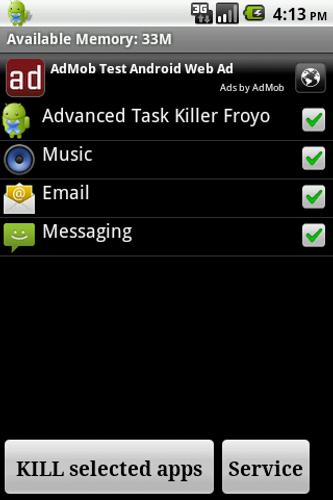
Advanced Task Killer is also known as ATK. It is a tool to kill applications running. This is the beta version for Froyo.
-Ignore List
-One tap widget
-Auto kill
-Customize item height
ATK is often used to kill apps and clean memory. We do suggest people use ATK manually kill apps instead of auto killing apps.
1. How to use it (for new users to quick start)?
It is pretty simple. Open this tool and take a look at the running applications list? Uncheck some apps you don't want to kill (such as Advanced Task Killer and some system apps) Tap the button 'Kill selected apps', it will kill all applications checked.
2. How to use it (for new users to do more)?
If you don't want to kill any application, you can tap it on the running applications list. Then it's checking box will turn to gray.
3. Why there are programs running that I haven't used or even opened?
Some applications will start up once you turn on your phone or be invoked by some events.
4. What is ignore list/ignore?
Ignore list is for you to ignore some applications you don't want to kill. If you long press on the application listed on the main screen of ATK, the menu will pop up, then you can select 'Ignore', the application would be moved to ignore list. When you tap 'Kill selected apps', it won't be killed any more.
5. What is default action for long press?
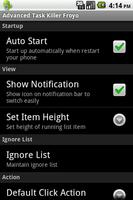
You can set your default action for long press and click on the settings. The system default action for long press is pop-menu. That means you when you long press on the application(displays on the running applications list), a pop-menu would shows up. For example, if you want to switch to the application after you long press on it, you can set the default action of long press to 'Switch to'.
6. Why I lost my network connection after I tap 'kill selected apps'?
This is because some apps related with network connection are killed. Such as 'voicemail'. You can ignore it instead of killing it.
7. Why my Home reloaded?
This is because some apps related with Home are killed. Such as 'HTC Sense', 'Mail'(if it is integrated with Home). You can ignore it instead of killing it.
8. Why I cannot receive notification of Email?
This is because you killed 'Email'. Instead of killing it, you need to ignore it.
9. What is Auto Kill?
If you want to kill apps automatically you need to choose one of auto-kill level
- Safe: Only kill the apps aren't running but still consume memory.
- Aggressive: Kill the apps running background and apps aren't running.
- Crazy: All apps except for apps you are using with.
You should be able to see Auto Kill information shows on the title, like 'Auto-Kill: 12:20'. That means auto kill will start at 12:20, you can also change the frequency to impact the auto kill start time.
-What's new
An option to put button bar at bottom or at top
Fixed FC bug
Note: For android 2.2 and later version, task manager cannot kill services and front apps, you have to force stop them. If you use task manager to kill them, services might restart, also notification won't be ereased from the top bar. So we don't suggest people use task manager kill them.






 Action Adventure
 Simulated Business
 Role Playing
 Sports Competition
 Casual Puzzle
 Card Strategy
 Music Rhythm
 Word Puzzle
 Flight Shooting
 Love Development
 Business Office
 Communication and Social
 Lifestyle and Entertainment
 Online Shopping
 Utility Tools
 Travel Travel
 Finance
 Education Learning
 Information Reading
 Sports and Health