
 Download
Dashclock ADB Extensionr
0.4 January 21, 2026- 8.3
- 1
- 2
- 3
- 4
- 5


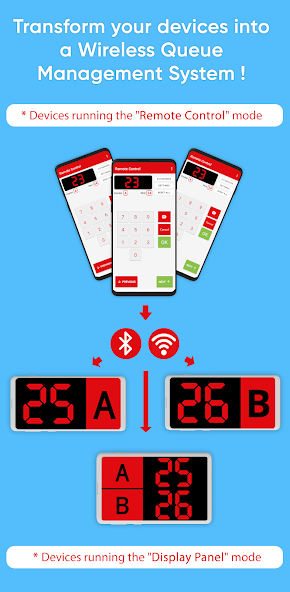
Transform your devices into a Wireless Queue Management System easily !
This app allows you to easily convert your Android devices into a wireless queue management system, using Bluetooth or Wi-Fi and Ethernet (local area network).
Features:
• Control multiple displays at the same time with one device.
• Possibility to have several displays and several devices that control these displays, such as for example the bank system, where there are several counters and each employee controls the displayed number (the next turn) linked to his counter.
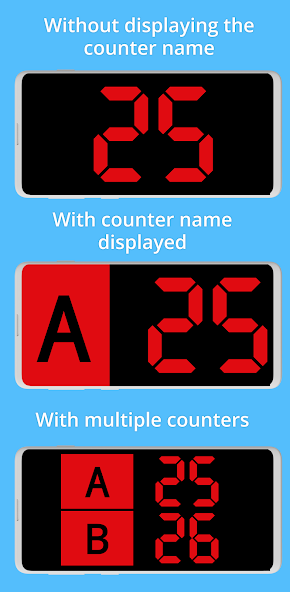
• Possibility to have multiple counters in a single display device.
• Possibility to display the counter (A, B, C...) in the display or hiding it.
• Multiple display customization options (Colors, Fonts, Sounds, Voice, Languages, Effect, etc.)
• Sound alert to notify people in the queue that the turn has changed (note: make sure the volume is not muted in the device)
• Possibility to announce the current number with "voice" using the device’s voice synthesis (Make sure the language is installed on both devices).
• Print tickets using thermal printers that support ESC/POS (Bluetooth, USB, TCP/IP).
• Easy control of the displayed numbers.
• AndroidTV/GoogleTV support
How it works:
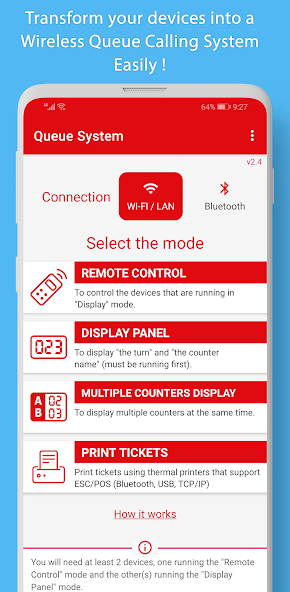
First, you need to install the app on all the devices you want to use. You will need at least two Android devices, one running "Remote" mode and the other or more running "Display Panel" mode. Then:
1. Choose the type of connection that will be used: "Bluetooth" or "Wi-FI/LAN", the chosen type must be used on all other devices as well.
2. On the first device (e.g. a tablet) launch the application in “Display Panel” mode, which will allow it to wait for connections from other devices running “Remote Control” mode.
3. On the second device, launch “Remote Control” mode (for Bluetooth, you will see the list of already paired devices), and you can press the “Search” button to find new devices.
4. Choose the first device you want to use and press "Next". If this is the first time, Bluetooth/Wi-FI pairing will take place. After that press “Next”.
Note on Bluetooth: If you do not see the devices you want to use, or the scanning is not working, please pair the devices manually from the system's Bluetooth settings.
5. If you have chosen a single device a window will open directly to control this device. If you have chosen several, a window will open asking you which device you want to control (as it is possible to have several devices controlling and several others displaying the numbers, and each person will be able to control their own "display panel"). ").
6. You can also modify the name of the counter, and choose to display it or not.





 Action Adventure
 Simulated Business
 Role Playing
 Sports Competition
 Casual Puzzle
 Card Strategy
 Music Rhythm
 Word Puzzle
 Flight Shooting
 Love Development
 Business Office
 Communication and Social
 Lifestyle and Entertainment
 Online Shopping
 Utility Tools
 Travel Travel
 Finance
 Education Learning
 Information Reading
 Sports and Health